SIMPLE CONTACT WIDGET FOR A WEBSITE WITHOUT A PLUGIN

A lighter no-code path for fast website contact

A simple contact widget without a plugin is usually a lightweight script-based button or launcher that adds one clear contact action to your website without extra plugin bloat, theme conflicts, or a full live chat stack.

This setup fits small businesses, freelancers, agencies, and website owners who want faster first messages, cleaner page UX, and a contact widget they can launch in minutes instead of managing another plugin.
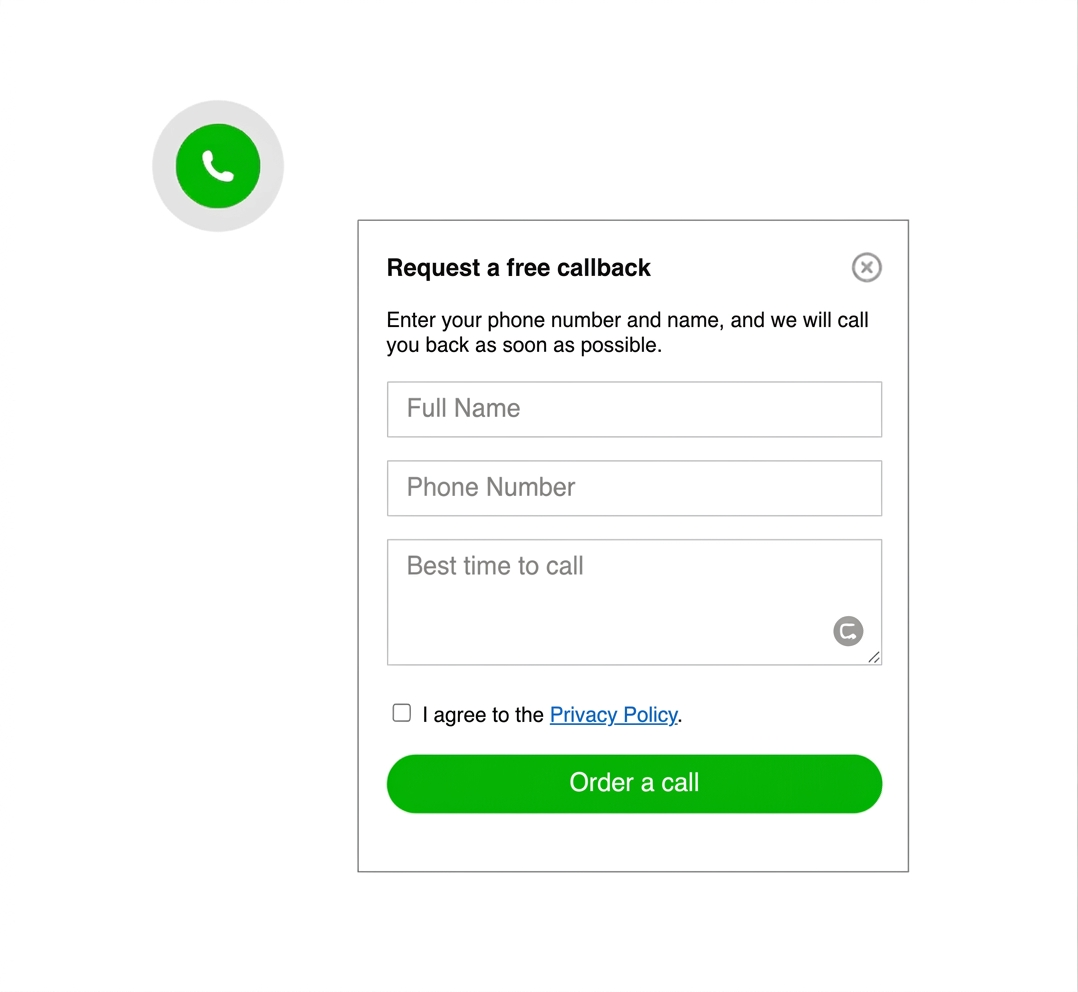
Simple contact widget shown on a website without plugin-heavy UI
Simple website contact widget preview with one clear contact action

WHY THIS MATTERS

many websites need faster contact, not a larger plugin stack

A plugin-free widget is often easier to launch, easier to maintain, and easier to keep clean on the page. Instead of adding another CMS extension, you keep one lightweight contact path visible where visitors are ready to ask, book, or buy.

If you need multiple messaging options instead of one simple launcher, compare this page with How to add messenger buttons to a website. If WhatsApp will be your main route, the closest focused guide is How to add a WhatsApp button to a website.

NO-CODE SETUP
Yes, you can add a simple contact widget without coding
Code snippet for a plugin-free contact widget setup
one script is usually enough

Most websites can launch a simple contact widget with one hosted snippet in the footer, a custom code field, or a theme injection area. That keeps setup light and makes future contact changes easier than managing another plugin.

Simple contact options inside one script-based widget
STEP BY STEP

How to launch a simple contact widget without a plugin

  1. Choose one primary contact action such as WhatsApp, Telegram, or a compact contact panel.
  2. Use the lightest script or embed option your platform supports instead of adding a full plugin.
  3. Place the widget on high-intent pages first, such as the homepage, service pages, pricing, and contact page.
  4. Check button size, spacing, and overlap on both desktop and a real phone.
  5. Keep a fallback path such as a contact form for longer or more detailed enquiries.
Fast launch icon for a simple contact widget

Fast to launch

A plugin-free widget is often live in one editing session instead of becoming another CMS maintenance task.
Placement icon for a plugin-free contact widget

Easy to place

The widget should stay visible without hiding CTA buttons, sticky bars, forms, or cookie controls.
Mobile-friendly icon for a simple website contact widget

Mobile-friendly

Most first-contact visits happen on mobile, so the tap target and spacing must be tested there first.
Platform compatibility icon for a script-based contact widget

Platform-safe

A script-based setup is usually easier to keep consistent across WordPress, Shopify, Wix, Webflow, Joomla, and HTML sites.

Platform guidance for plugin-free setup

The cleanest approach depends on how your website is edited, but the goal stays the same: keep one simple contact widget live without creating unnecessary plugin overhead.

WordPress: use a theme snippet area, code injection field, or footer script tool when you want fewer plugin conflicts.

Shopify and Wix: use the platform's supported custom code or embed route, then test against sticky mobile UI such as cart and booking bars.

Webflow and HTML sites: a direct script insert is usually the simplest workflow because you control the layout and deployment path.

Joomla: add the widget through template-level code placement so the behavior stays stable across pages.

Platform checklist
  • WordPress: prefer one snippet over stacking button plugins
  • Shopify: confirm the widget does not clash with floating cart UI
  • Wix: keep the contact button visible without covering booking elements
  • Webflow and HTML: place the script once and re-check the published page
  • Joomla: verify template output after publishing
  • All platforms: test the final position on a real phone
Related guides

If you want a broader no-code comparison after this page, continue with Best no-code chat widget for small business or browse more setup examples in the YourChat blog.

WHAT A SIMPLE CONTACT WIDGET SHOULD DO

Give the visitor one obvious next step

The widget should not feel like a mini support center. A simple setup works best when it reduces hesitation, opens one clear contact path, and respects the main job of the page.

If your audience strongly prefers a single WhatsApp path, compare this page with WhatsApp Button for Website and the WhatsApp setup guide.

Simple contact widget example on a phone screen

PLACEMENT AND UX GUIDANCE

Where the widget should live on the page
Bottom right is still the strongest default for many websites, but the best position is the one that stays visible without blocking form fields, sticky buy bars, or cookie notices on mobile.

1

PRIMARY CONTACT ACTION

3

HIGH-INTENT PAGES TO START

5

MINUTES TO REVIEW ON MOBILE
Simple floating contact widget layout with clean placement
Keep the contact path short and obvious

three simple contact approaches

WHICH ONE FITS THIS USE CASE

Option 1

PLUGIN

when the CMS insists

A plugin can work when your platform strongly prefers plugins, but it often adds more settings, more updates, and more conflict risk than a simple contact widget actually needs.
use when custom code is limited

Option 3

FORM

for longer requests

best as fallback
A contact form still matters when visitors need to explain scope, attach details, or submit structured information. It supports the widget well, but it is not the fastest first-contact path.

script widget vs plugin vs contact form

If your goal is fast first contact with less maintenance, a script-based widget is usually the strongest middle ground. It is lighter than a plugin-first approach and faster for visitors than sending them straight to a long form.
A plugin still has a place when the CMS makes custom code difficult. A form still has a place when visitors need to send more detail. The simple setup is usually one widget plus one fallback form, not three competing contact systems.
OBJECTION HANDLING

You do not need full live chat to keep contact simple

A simple contact widget is often enough when the real goal is to start more first conversations. You only need heavier live chat tooling when you have an active support workflow, agent routing, or a larger service operation.
For many business websites, the clean answer is straightforward: let the widget handle quick contact and keep the contact form as the backup for detailed requests.

Simple contact widget compared with form and heavier live chat setup
Common mistakes when adding a simple contact widget to a website
COMMON MISTAKES TO AVOID

Do not let the widget fight the page

keep it useful, not intrusive

  • Do not add several overlapping contact plugins and widget bubbles at the same time.
  • Do not place the widget over forms, checkout controls, sticky bars, or cookie prompts.
  • Do not skip testing after publishing on a real mobile device.
  • Do not choose a support-heavy tool if you only need a simple first-contact path.
QUICK CHECKLIST

Before you publish, confirm the widget stays simple in both setup and visitor experience.

  • One clear contact action
  • Script or embed path chosen before adding another plugin
  • Visible on the pages where visitors are ready to contact you
  • Tested on mobile without overlap
  • Fallback form kept for longer requests

Frequently asked questions about simple contact widgets without plugins

What is a simple contact widget for a website without a plugin?

It is usually a lightweight script-based button or launcher that adds one clear contact path to your website without installing a heavy plugin.

Can I add a simple contact widget without coding?

Yes. Most websites can add one widget snippet through a footer injection field, custom code area, or theme-level insert point.

Will a simple contact widget work on mobile and desktop?

Yes, as long as you test final placement on both screen sizes and make sure the widget does not cover navigation, forms, sticky bars, or cookie notices.

Is a script better than a plugin for this setup?

Usually yes. A script-based widget is often lighter and easier to maintain, while plugins make more sense when the platform strongly depends on them.

Should I use a plugin, script, or contact form?

Use a script when you want a simple cross-page contact widget, use a plugin only when the CMS limits custom code, and keep a form for longer or more structured enquiries.

Is a simple contact widget better than full live chat?

Often yes for smaller business websites. A simple widget is easier to launch and lighter to maintain when the main goal is faster first contact rather than a full support workflow.

Need more setup examples after this page? Browse the English blog guides or compare with What Is a Website Contact Widget?.

a simple plugin-free widget can work on almost any website

If your site allows a code snippet, custom HTML block, or footer injection, you can usually launch a simple contact widget without changing the full page structure. That keeps the setup practical for teams that want cleaner contact and fewer CMS moving parts.